 | This article may require cleanup to meet this wiki's quality standards. You can help us by improving it. Learn how here. |
| TooManyItems | |
|---|---|
 | |
| Current developers | Marglyph |
| Version | 1.8 |
| Supported Minecraft versions | 1.8 |
| Mod loader | Yes (not required to work) |
| URL | Link |
TooManyItems is a mod created by Marglyph. The mod allows the player to visually choose and place any object (blocks or items) from the game directly into their inventory without the need to type commands such as /give <ID> (unlike INVedit, which requires going to the menu to edit the inventory) An infinite amount of items, blocks, and tools can be acquired at any time. It also allows players to save up to seven different inventories and discard items when they are not needed. The mod is currently compatible with Minecraft versions from Beta 1.2 to 1.8. The mod needs Modloader to make unlimited stacks of blocks refresh automatically, though this is only for versions before 1.8.
Features
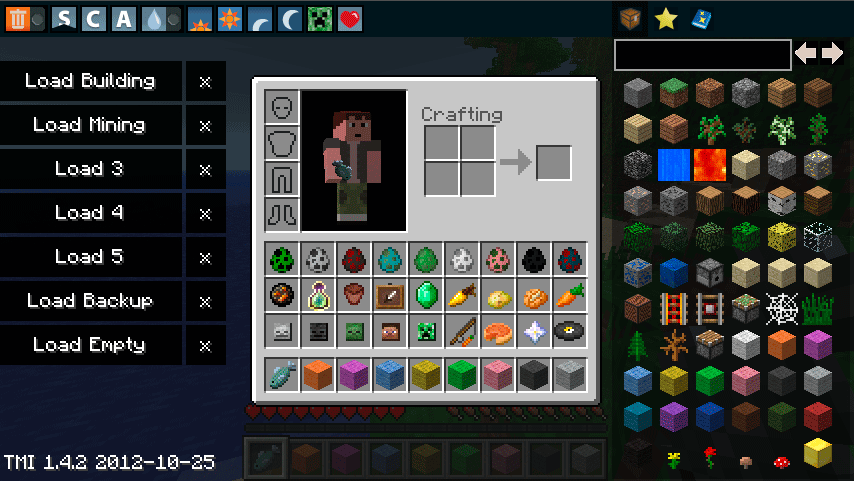
TooManyItems does not require any other mod to run, but Modloader is needed for unlimited items prior to Minecraft version 1.8. When playing, there is a menu that appears when a player opens their inventory, displaying all blocks and items, including ones not obtainable in Creative mode (including fire, End Portal frames, and all other entities that cannot be obtained in vanilla Minecraft). Left-clicking an item/block in the menu will instantly place a stack of it in the player's inventory, shift left-clicking will place an infinite stack (displayed as 111 units in a stack) in the inventory, and right-clicking will place one copy of the item in the inventory. From TooManyItems version 1.0.0, players can change between creative and survival modes, change the time from dawn, noon, dusk, and midnight, and toggle rain/snow with the toolbar at the top. In newer versions, every tool is located to the right of the inventory. If this feature is unwanted it can be disabled by opening the mod's config file and setting itemsonly:false to itemsonly:true. Right-clicking on the output square when crafting will craft the maximum possible amount of the recipe based on the number of items placed in the input slots. Shift-clicking an item in the inventory transfers it to the other opened inventory without dragging it, though this feature was already put in vanilla Minecraft around the Adventure Update.
The mod is good for multiplayer use, as it allows players to quickly change game modes.
How to install
To install TooManyItems download the file, open it and drag all the files to minecraft.jar; afterwards, delete META-INF. This is only for outdated versions of Minecraft.
As of the new launcher update, it can be downloaded as a Minecraft Forge Version. Download Minecraft Forge here and the TooManyItems Forge version here. Run the Forge installer, click on "Install to client." When Minecraft Forge is finished installing, drag and drop the TooManyItems file into the mods folder in the .minecraft directory. When finished, open the launcher and select the "Forge" profile. Click on play and create/load a world.
Note: If TooManyItems does not appear when opening the player's inventory, press "O". Pressing the "O" key again will hide it.
Warning: This mod is useful for single player use, but when using it for items IDs on servers caution should be exercised. Most of the time though the block IDs for the blocks will match. ID mismatching would only really come into play if the server had an admin shop plugin. These seem to be more common with the addition of new blocks or block directions as of 1.3.1. Also on servers, to receive the items desired the give command must be used. This will always spawn the correct item even though that particular item may not work in the admin shop.
Forks, rewrites, and unofficial updates
TMI has recieved several unofficial updates; in 2016, Wotblitz rewrote TMI, calling it ExtraMoreItems, and making it compatible 1.10.2 through 1.12.2.[note 1]
Howard ZHY made an update for 1.8.8/1.8.9, and ported TMI to Legacy Fabric 1.8.2-1.8.9 and 15w14a in 2022.
Trivia
- In singleplayer, shift left-clicking on armor items in an attempt to get infinite armor will render the player invincible (with the exception of the void) when equipped. This persists even after the armor is removed or thrown away in the trash.
- The TooManyItems box and information can be shown and hidden by pressing the "O" key by default. This can be changed in the config file.
- When changing to survival mode while not wearing armor in flight, pressing the "Shift" key will cause the player to take fall damage depending on how high up they are.
- This mod was known to update to Minecraft's current version very fast.
- On vanilla servers, TooManyItems will drop items in front of the player instead of placing stacks of 64 directly into their inventory.
- It is possible to change what type of mob the mob spawner spawns, with the exception of Withers and Witches. To do this, go to the config file and change "spawner:Pig" to "spawner:(mob)". The entity's name must be capitalized.
- In multiplayer, players cannot delete their items/blocks via the Trash Button, nor can they use unlimited stacks or save inventories.
- It sometimes does not work with Forge (some have found TMI 1.4.7 compatible with Forge-universal 1.4.7 as well as TMI 1.5.2 compatible with Forge-universal 1.5.2 build 7.8.0.716)
Special buttons
In the TooManyItems mod, there are 13 buttons on the top-left in older versions. In newer versions they are located to the right side of the inventory.
- Trashcan button: Delete item/Deletes all items in inventory when Shift Clicked
- Sunrise button = Changes time to dawn
- Moonrise button = Changes time to dusk
- Sun button = Changes time to midday
- Moon button = Changes time to night
- Rain Drop button = Changes weather to Rain/Snow
- "C" button = Changes game modes
- Creeper button = Changes difficulty
- Heart button = Restores health and hunger.
- Chest button = Displays list of items
- Book button = A page that allows players to place an item in a black square and enchant it. White text means it can be done by vanilla means and red means it is not possible in vanilla but can still be done with TooManyItems. Next to the Enchantments is a - and a + sign which can equipment a lower or higher enchantment rank. When the player has the enchantment(s) they want, they will click the Make button. On the enchanting page you can also name the item and save it to a favorite page.
- Bottle button = Displays a page where players can make their own potions. The potion's rank, number of effects, and area of effect can be edited. To make the potion press the Make button. It can also be saved to the player's favorites.
- Star button = Displays the Favorite page. They are used to store saved enchanted items and potions.
- Firework button = Displays a page where players can make their own fireworks by choosing the shape, size, and colors. The rocket's flight time before exploding can also be edited.
Download
The file can be downloaded from the forums here, and is only officially compatible with all version in-between Beta 1.2 and 1.8.
Notes
- ↑ The post that used to host the update was deleted.
Gallery
-
 Inventory screen with the mod TooManyItems installed.
See also